
In this series, we’re exploring the latest SmartTools updates and what they mean for our users.
Our AI capability updates are covered separately. The latest version is available to read here.
Catch up on previous updates:
1. Quickly understand complex engineering tickets with AI summaries
Engineering tickets are designed to be read by network engineers: they are often highly technical, information-dense and several pages long.
The Ticket Summarisation feature automatically reads these complex engineering tickets and generates a clear, concise summary. The feature is designed to help customer support agents to provide a quick, clear explanation of the issue to customers. Summaries are created as soon as the ticket is uploaded, enabling agents to quickly access it when on a call.
The feature helps teams to:
- Reduce the time customers spend waiting on hold
- Provide clearer explanations of technical issues
- Improve consistency across customer interactions
- Give agents greater confidence when discussing network faults

2. Visualise A2G connectivity for drones and aircraft
The new Air-to-Ground (A2G) capability visualises mobile network performance across airborne operational environments. The feature allows users to view flight test data in SmartTools and analyse A2G network performance by location, altitude and flight path alongside other coverage and operational datasets.
Users can review vertical test results, select individual flight paths and explore the associated measurements through clear visualisations and performance graphs. This makes it easier to identify coverage gaps, investigate changes in service at different heights and assess whether the network is meeting operational requirements. The capability is particularly valuable for use cases in aviation, emergency response, public safety, defence and other services where reliable airborne connectivity is critical.
3. View insights into your competitors' networks
The new Competitor Intelligence layers use crowdsourced data to provide insights into how external networks change over time.
There are three different views available:
- Inferred Sites: gives users visibility of estimated competitor site and cell locations derived from crowdsourced measurements. It helps identify whether sites or cells are unchanged, newly detected or no longer detected between two selected periods, giving users a clearer view of competitor network footprint changes.
- Capacity Evolution: focuses on changes to competitor carrier and PCI configuration over time, including EARFCN, NR-ARFCN and PCI values. It helps users spot where competitor capacity may have been added, changed, removed, or left unchanged, with colour-coded classifications for quick map-based review.
- Technology Evolution: shows how competitor network technologies have changed between selected quarters. It highlights where additional technologies have been detected while also showing sites with no technology change, helping users identify potential competitor upgrades or technology rollout activity.
For each of the three layers, users can compare selected quarters to identify inferred site or cell changes, capacity changes and technology evolution, with operator-specific layers. The features use improved triangulated site/cell inference based on a 12-month crowd measurement baseline, helping provide more stable locations and clearer change tracking between reporting periods.
4. Analyse in-building coverage by floor
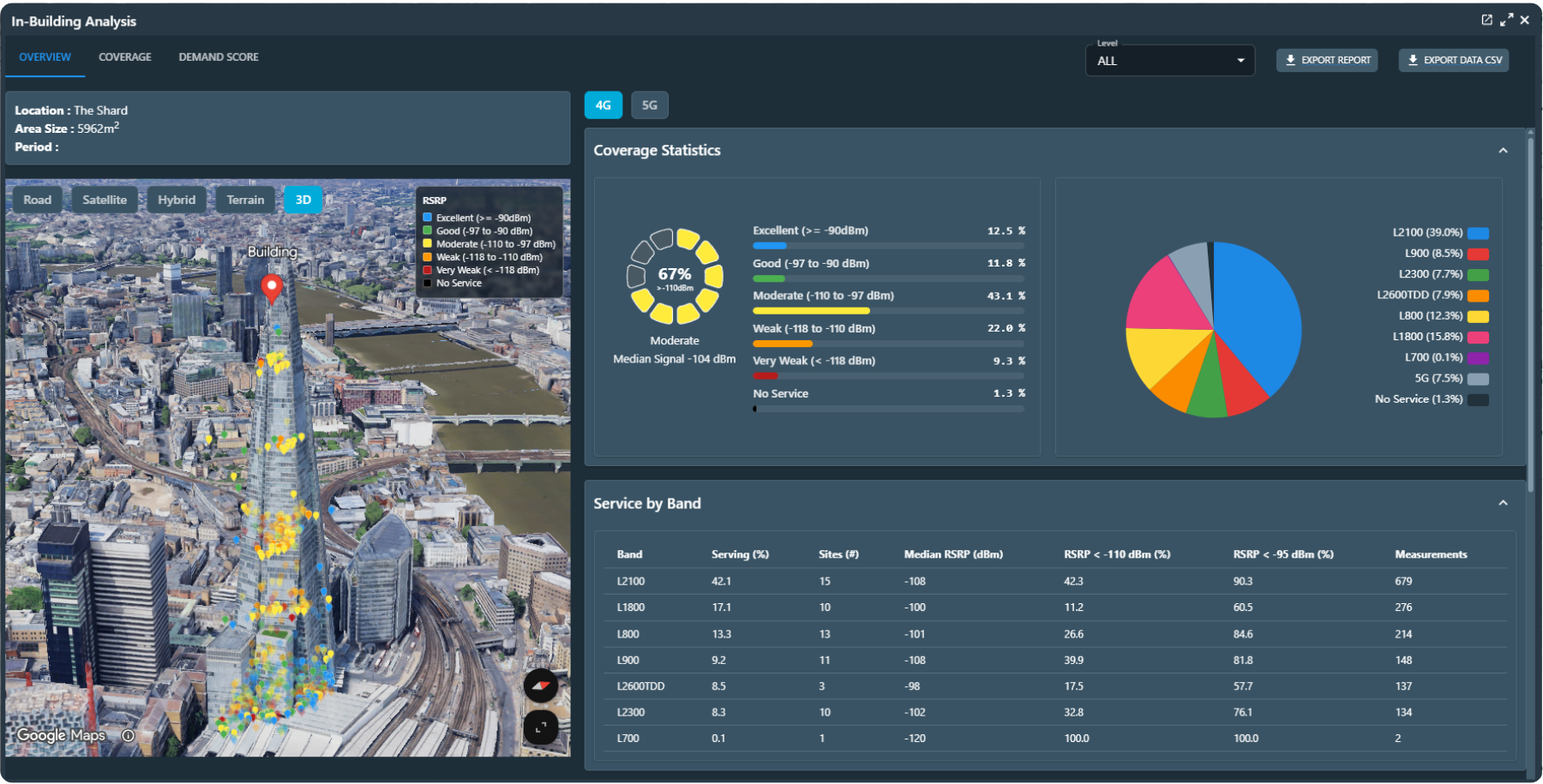
In-Coverage can now be visualised floor-by-floor within a building, rather than viewing all measurements as a single combined dataset.
The feature uses crowdsourced data to analyse coverage by height level, using 6m elevation bands such as 0–6m, 6–12m and 12–18m. To use it, open the relevant internal or external building layer and select the required level filter. The map points, area summary and best-serving-cell information will update to reflect only the selected height band.
5. View crowdsource data by quarter, by month or now by week
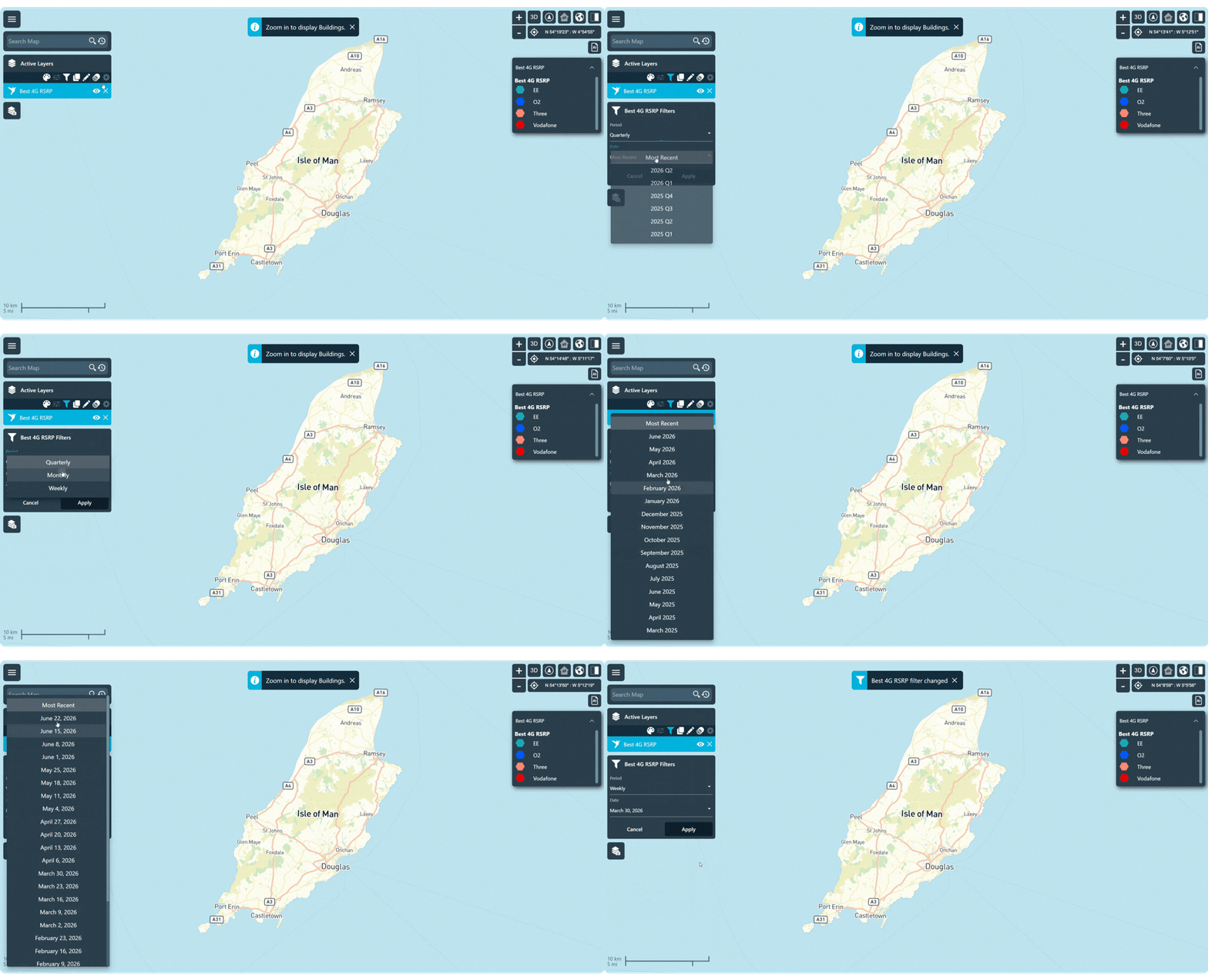
We have added a new time filter for viewing crowd data. Alongside the quarterly and monthly options, users can now view crowd data on a week-by-week basis.
Where the crowd data is available, this feature provides users with more granular visibility into the performance of the network to support more frequent analysis and processing workflows.
To access the new weekly view, open the time filter on an external crowd layer and select “Week”. The existing Monthly and Quarterly options remain available and will continue to work as before.
Accessing These Features:
User Guide Library:
SmartTools user guides are available here: https://support.metricell.com/kb. If you have previously contacted the Metricell Helpdesk, an account will already exist.
Existing customers:
If you would like to enable or learn more about any of the features listed above, please speak to your account manager.
Prospective customers:
If you would like a demo or want to discuss a specific capability, please email us at marketing@metricell.com or submit an enquiry via our website.
.png)


